

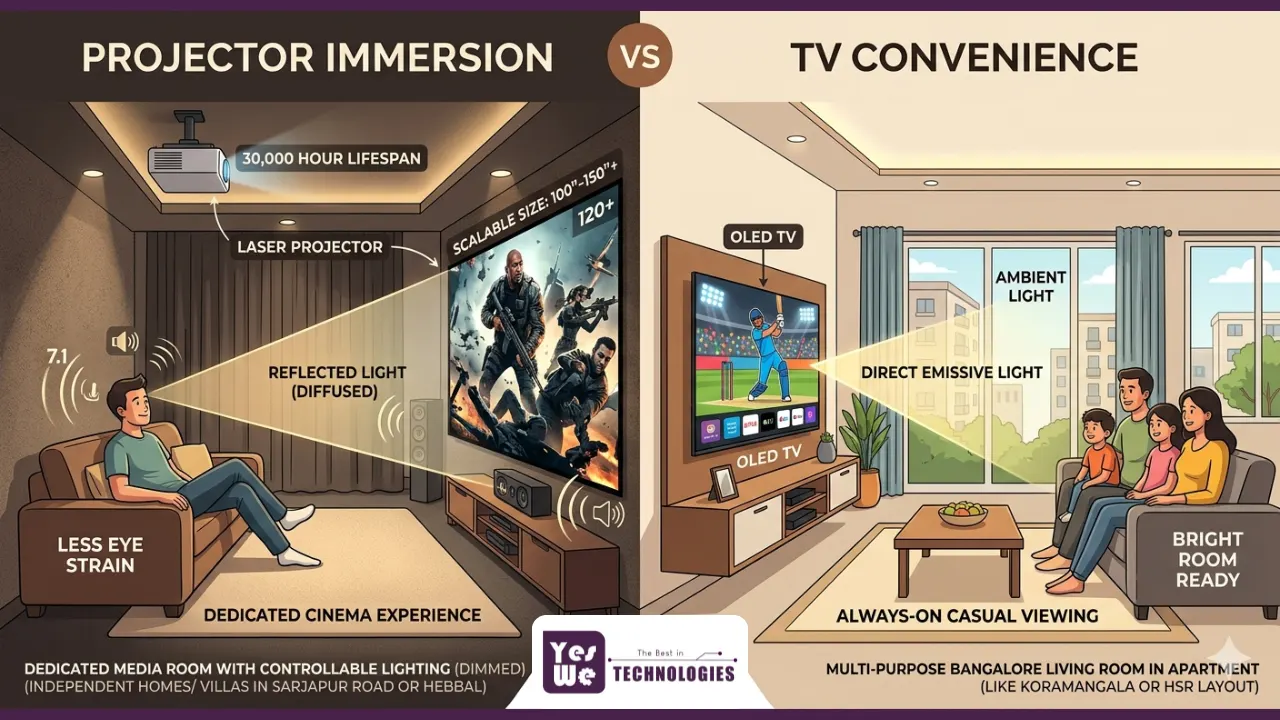
At some point in every home theatre journey, you hit the same crossroads: projector or TV?
It seems like a simple question. But the more you look into it, the more you realise it is one of the most consequential decisions in your entire home cinema setup. The wrong choice can mean spending a significant amount of money on a display that does not actually suit your room, your lifestyle, or the way you watch content.
The honest answer is that neither is universally better. What is better depends on whether your priority is convenience or immersion, whether your room has controlled or ambient lighting, whether your living room doubles as a cinema or has a dedicated theatre space, and what your total budget looks like.
This guide walks through every dimension of the projector vs TV comparison — screen size, image quality, eye comfort, technology, cost, specific use cases, and what actually works in Bangalore homes — so you can make a genuinely informed decision rather than one based on marketing claims from either side.
Key Takeaways
| 💡Projectors deliver screen sizes from 60 to 300+ inches; TVs cap out below 100 inches for most budgets. 💡TVs win in bright rooms and for casual daily viewing; projectors win for dedicated cinema in controlled lighting. 💡Projectors use reflected light, like natural vision — making them significantly easier on the eyes for long viewing sessions. 💡Laser projectors now rated at 30,000 hours eliminate lamp replacement entirely and maintain consistent brightness over time. 💡A 4K laser projector with an ALR screen and Dolby Atmos audio delivers a cinema experience no TV can match for immersion. 💡For Indian apartments, a premium TV or UST projector suits multi-purpose rooms; laser projectors suit dedicated rooms in independent homes and villas. 💡Smart projectors with auto-focus, keystone, and Android TV built in have eliminated the old setup friction that made projectors impractical. 💡The best Bangalore home theatre setups combine professional projector or TV installation with smart home automation and acoustic treatment. 💡Yes We Technologies installs and calibrates both projector and TV-based home theatre systems across Bangalore. |
Understanding the Core Difference: How a Projector and TV Actually Work
Before comparing features and prices, it helps to understand the fundamental difference in how these two technologies create an image — because this difference has real implications for everything else.
TVs: Emissive Displays
A TV is an emissive display. It generates its own light and fires it directly at your eyes. Whether it is an LED-backlit LCD panel, an OLED panel where each pixel self-illuminates, or a QLED panel using quantum dots to enhance colour — the light originates from the screen and travels straight to you.
This is effective in bright rooms because the display is competing with ambient light and winning. But it also means you are essentially looking directly at a light source for the entire duration of your viewing session.
Projectors: Reflective Displays
A projector is a reflective display. It projects light onto a surface — a dedicated screen or a wall — and that surface reflects the light back to your eyes. This is precisely how we see everything else in the natural world: light bounces off objects and reaches our eyes.
The practical implication of this is significant: the light path is diffused before it reaches you, which is far more natural for the human visual system and substantially reduces eye strain over extended viewing periods.
| Display Technology | Type | How Light Reaches Your Eyes |
|---|---|---|
| LED / LCD TV | Emissive | Direct from panel backlight |
| OLED TV | Emissive | Direct from self-lit pixels |
| QLED TV | Emissive | Direct from panel with quantum dots |
| DLP Projector | Reflective | Bounced off projection screen |
| LCD Projector | Reflective | Bounced off projection screen |
| Laser Projector | Reflective | Bounced off projection screen |
This is the foundational context for the entire comparison that follows. Nearly every meaningful difference between projectors and TVs — eye comfort, image contrast, ambient light performance, screen size flexibility — traces back to this core distinction.
Screen Size and Immersion: Where Projectors Win Decisively
Screen size is not just a preference. It is a physical component of the cinema experience. When a screen fills more of your field of vision, it engages your peripheral vision and creates a genuine sense of presence inside the content rather than watching it from a distance.
TVs have improved dramatically, but they hit a hard ceiling: consumer TVs max out at around 85 to 98 inches for most realistic budgets. Beyond that, the price increases steeply and the wall space requirements become architectural. Most Bangalore living rooms simply do not have the wall space for a 98-inch TV, let alone the budget.
Projectors scale effortlessly from 60 to 300 inches using the same unit, and the cost per inch of screen drops sharply at larger sizes.
| Display | Screen Size | Approx. Cost in India | Cost per Inch |
|---|---|---|---|
| Premium QLED TV | 65 inch | Rs 1,20,000 – Rs 2,00,000 | Rs 1,850 – Rs 3,000 |
| Premium OLED TV | 77 inch | Rs 2,50,000 – Rs 4,00,000 | Rs 3,200 – Rs 5,200 |
| Mid-range 4K Projector + Screen | 100 inch | Rs 80,000 – Rs 1,50,000 | Rs 800 – Rs 1,500 |
| Laser 4K Projector + Screen | 120 inch | Rs 2,00,000 – Rs 4,00,000 | Rs 1,600 – Rs 3,300 |
| Premium Laser Projector + Screen | 150 inch | Rs 4,00,000 – Rs 8,00,000 | Rs 2,600 – Rs 5,300 |
The math is clear: at any budget above Rs 2,00,000, a projector delivers significantly more screen for the same investment. And beyond 100 inches, the projector is the only practical option — there is simply no TV that competes.
For homeowners in Whitefield, Sarjapur Road, and Hebbal who are building dedicated home cinema rooms in their villas, this is the primary reason laser projectors with 120 to 150 inch screens have become the default choice over even the best TVs.
Brightness and Picture Quality: Where the TV Holds Its Ground
Image quality is where the comparison gets more nuanced — and where the TV genuinely earns its keep.
The Ambient Light Problem
In a bright room, TVs win. Full stop. They maintain strong contrast and vivid colour even with windows open and overhead lights on. Projectors, by contrast, need at least partial ambient light control to perform well. Project onto a wall in a bright living room and the image will look washed out, with low contrast and muted colours.
This is the single biggest practical limitation of projectors for living room use — and it is also the most solvable one, with two key approaches: high-lumen laser projectors (which can push through more ambient light), and ALR screens, which are designed specifically to reject off-axis ambient light while accepting the projector’s light head-on.
ALR Screens: The Game Changer for Living Room Projectors
ALR (Ambient Light Rejection) screens use optical layering to selectively reflect the projector’s beam — which comes from a specific direction — while rejecting ambient light arriving from other angles. The result is dramatically better contrast and colour accuracy in a room that cannot be fully darkened.
For Bangalore apartments where blackout conditions are not always achievable, an ALR screen paired with a high-lumen projector can significantly close the ambient light gap with a TV.
A Head-to-Head Quality Comparison
| Quality Factor | TV (OLED/QLED) | Projector (4K Laser) |
|---|---|---|
| Peak Brightness | 500 – 2,000 nits; excellent | 3,000 – 6,000 lumens; depends on screen |
| Contrast Ratio | OLED: infinite; QLED: 10,000:1+ | Laser: up to 150,000:1 in dark room |
| Colour Accuracy | Excellent (Dolby Vision, DCI-P3) | Excellent on laser; DCI-P3 wide gamut |
| Black Levels | OLED: unmatched; QLED: very good | Depends heavily on room darkness |
| Ambient Light Performance | Excellent | Needs ALR screen or dark room |
| HDR Performance | Dolby Vision on premium TVs | HDR10, HLG on premium projectors |
| Max Screen Size (practical) | ~98 inches (consumer) | Up to 300 inches |
The bottom line on image quality: TVs have the edge in bright environments and in OLED black levels. Laser projectors match or beat TVs on everything else in a controlled lighting environment — and win decisively on screen size at any given price point.
Suggested read 👉 How to Turn Your Living Room into a Home Theatre: The Complete 2026 Setup Guide
Eye Comfort and Health: The Projector’s Most Underrated Advantage
This is the dimension of the projector vs TV comparison that gets the least attention — and arguably matters the most for households that watch significant amounts of content.
Direct Light vs Reflected Light
Every TV is essentially a large light source pointed directly at your eyes. The brightness that makes TVs work well in ambient light is also what causes eye fatigue, headaches, and visual discomfort during long viewing sessions. This is particularly relevant for binge-watching, movie marathons, and households where the TV is on for several hours a day.
Projectors produce reflected light. The projector beam hits the screen surface and is diffused as it bounces back to your eyes. This diffusion reduces the intensity and directness of the light reaching your retina — mimicking the way we experience all other objects in the natural world. The result is significantly less eye strain, even during extended viewing periods of two to three hours or more.
Blue Light Exposure
TVs — particularly LED-backlit LCD panels — emit higher levels of blue light directly at the viewer. Prolonged blue light exposure has been associated with disrupted circadian rhythms and increased eye strain. Projectors emit far less direct blue light due to the reflected light path, making evening movie sessions meaningfully less disruptive to sleep patterns.
The Large Screen Eye Comfort Benefit
There is a counterintuitive benefit of large screens that most people do not realise: bigger screens are actually easier on your eyes. When the image is smaller, your eyes must work harder — squinting slightly, tracking fine details, and adjusting focus on small text or detail. A 120-inch projector screen with large, clearly visible images requires noticeably less eye muscle effort than a 65-inch TV at the same viewing distance.
For families in Bangalore with young children who watch significant amounts of content, this distinction is worth factoring seriously into the display decision.
| 📍 Bangalore Family Tip: If your household watches 2+ hours of content daily — movies, cricket matches, OTT series — the eye comfort advantage of a projector compounds significantly over time. The reflected light path that projectors use is closer to natural vision than the direct-emission light of any TV panel technology. |
Projector Technology in 2026: Why the Old Objections No Longer Apply
Many of the reasons people avoided projectors ten years ago — complicated setup, frequent lamp replacements, poor performance in ambient light, no built-in streaming — have been addressed comprehensively by modern projection technology.
Laser Projectors: The Biggest Leap Forward
Traditional lamp projectors required expensive bulb replacements every 3,000 to 5,000 hours of use. Laser projectors have no lamp at all — they use a solid-state laser light source rated at 20,000 to 30,000 hours. At three hours of daily viewing, a 30,000-hour laser projector would last approximately 27 years before the light source degraded. In practical terms, you will likely upgrade your projector for technology reasons long before the laser ever needs replacing.
Laser projectors also maintain consistent brightness across their entire lifespan. Lamp projectors dim gradually as the bulb ages, but laser output stays near-constant — so the image you see in year five is almost indistinguishable from the image at first install.
DLP vs LCD vs Laser: A Quick Technology Guide
| Technology | Best For | Key Characteristic |
|---|---|---|
| DLP (Digital Light Processing) | Home cinema, gaming | Sharp images, minimal motion blur, good contrast |
| LCD (Liquid Crystal Display) | Bright rooms, presentations | High brightness, vivid colour, affordable |
| Laser (Single / Triple Chip) | Premium home cinema | Best colour volume, 30,000hr lifespan, no lamp maintenance |
Auto-Focus and Auto-Keystone: Setup Without the Frustration
Modern projectors ship with automatic focus calibration and keystone correction. Point the projector at the screen, power it on, and it calibrates itself. No manual adjustment wheels, no spending 20 minutes aligning the image. This is one of the most practically significant improvements in recent projector generations — it removes the barrier that made projectors feel like a chore to use casually.
Short-Throw and Ultra-Short-Throw Projectors
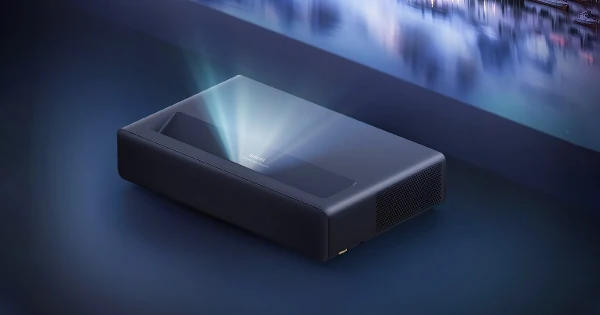
Throw distance — the space between the projector lens and the screen — is often cited as a reason projectors do not work in smaller rooms. Short-throw and ultra-short-throw (UST) projectors address this directly. A standard-throw projector needs 3.5 to 4.5 metres for a 100-inch image. An ultra-short-throw projector needs just 15 to 40 cm — placing the unit directly on a media console below the screen, much like a TV.
| Projector Type | Throw Ratio | Distance for 100-inch Image | Best Room Size |
|---|---|---|---|
| Standard Throw | 1.5:1 to 2.0:1 | 3.5 to 4.5 metres | Large rooms (5m+) |
| Short Throw | 0.5:1 to 1.5:1 | 1.0 to 2.5 metres | Medium rooms (3-5m) |
| Ultra-Short Throw (UST) | Under 0.4:1 | 15 to 40 cm | Any room size |
Smart Projectors: Streaming Built In
Most current premium projectors ship with Android TV or equivalent smart platforms, giving you direct access to Netflix, Prime Video, YouTube, Disney+, JioCinema, and every major streaming platform without any external device. Voice control via Google Assistant or Alexa is built in on many models. The projector is now a complete entertainment hub, not just a display.
4K UHD and Wide Colour Gamut
Projectors are no longer behind TVs on resolution. Native 4K UHD laser projectors deliver four times the detail of Full HD, and support for wide colour gamut standards — DCI-P3, Rec. 2020 — ensures that the colour space matches what directors intended when mastering content for cinema. High frame rate support (up to 240Hz at 1080p on gaming-focused models) ensures smooth motion for both sports and gaming.
TVs in 2026: Where They Still Genuinely Win
A balanced comparison requires giving TVs their full credit. Modern TVs — particularly OLED and Mini-LED panels — are genuinely excellent displays, and for many Bangalore households, they remain the better practical choice.
OLED: Unmatched Black Levels and Contrast
OLED technology achieves something no projector can match: true infinite contrast, where individual pixels switch off completely to produce absolute black. In a scene with both bright highlights and dark shadows, an OLED TV renders a depth and dimensionality that is visually extraordinary. For those who prioritise image quality in a mixed-lighting environment over sheer screen size, OLED is a compelling choice.
Always-On Convenience
TVs are always ready. Turn them on and they are immediately bright, sharp, and perfectly focused. No warm-up, no alignment, no room darkening required. For casual everyday use — morning news, afternoon cricket, background entertainment while cooking — this instant availability is genuinely valuable and projectors cannot replicate it without meaningful compromise.
Multi-Purpose Room Practicality
In a Bangalore apartment where the living room is also the dining space, study area, and social gathering space — and where the lights are on most of the time — a TV is simply more compatible with the room’s actual function. It works at any time of day without mode-switching or environment management.
Where TVs Clearly Win
- Bright, multi-purpose living rooms with significant ambient light
- Rental apartments where projector installation is not practical or permitted
- Bedrooms and secondary screens where space is limited
- Always-on casual viewing: news, sports, background content
- Households without a dark viewing environment available
- Fast-paced gaming where single-millisecond input lag differences matter
Space, Setup, and Flexibility
Setup and space requirements are practical realities that directly shape which option makes sense for your specific home.
TV Installation
TV installation looks simple but has its complications. Wall mounting requires wall type assessment, stud location, correct bracket selection, levelling, and cable management to avoid a mess of visible wires. Getting this done properly usually means professional installation — which adds cost and time. Once installed, the TV is a permanent fixture on one wall at one size.
Projector Installation Options
Projectors offer substantially more flexibility in how they are set up:
- Table or tripod placement: immediate, portable, no permanent installation
- Ceiling mount: clean, permanent, optimal for dedicated rooms — the standard for professional home cinema installations across Bangalore
- UST placement: unit sits on a media console inches from the screen — closest to TV-style installation with projector-scale imagery
Screen Selection
- Motorized retractable screen: best for multi-purpose rooms — screen disappears when not in use, wall looks normal
- Fixed frame screen: best for dedicated cinema rooms — maximum image quality, permanent installation
- ALR (Ambient Light Rejection) screen: best for rooms with ambient light — rejects off-axis light, dramatically improves contrast in living room conditions
Portability as a Real Advantage
One dimension of projectors that TVs simply cannot match is portability. The same projector used in your living room can move to the bedroom for a large-format gaming session, to the terrace for an open-air movie night, to the drawing room for a family gathering, or even outdoors for events. For independent homes and villa owners in Bangalore, this versatility adds genuine value beyond the primary home theatre use case.
Cost Comparison: Upfront Investment and Long-Term Value
Cost is where the comparison gets specific, and where projectors consistently surprise people with how much screen they deliver per rupee spent.
Entry-Level to Premium: What You Get for Your Budget
| Setup | Entry Level | Mid Range | Premium |
|---|---|---|---|
| TV (55 to 65 inch) | Rs 35,000 – Rs 70,000 | Rs 70,000 – Rs 1,50,000 | Rs 1,50,000 – Rs 4,00,000+ |
| Projector + Basic Screen | Rs 30,000 – Rs 60,000 | Rs 60,000 – Rs 1,50,000 | Rs 2,00,000 – Rs 8,00,000+ |
Hidden Costs to Factor In
For a projector setup, budget separately for:
- Projection screen: Rs 15,000 to Rs 2,00,000 depending on type (basic fixed vs motorized ALR)
- Ceiling mount: Rs 3,000 to Rs 15,000
- Audio system: if the projector’s built-in speakers are not sufficient, a dedicated 5.1 system or soundbar
- Installation and calibration: Rs 5,000 to Rs 50,000 depending on complexity
For a TV setup, budget separately for:
- Wall mount: Rs 2,000 to Rs 10,000
- Soundbar or surround speaker system: Rs 10,000 to Rs 3,00,000+
- Professional installation: Rs 2,000 to Rs 15,000
Additional read 👉 Home Theatre Setup Cost in Bangalore: The Complete 2026 Guide
Long-Term Value (5-Year Horizon)
Traditional lamp projectors have a meaningful running cost: lamp replacements at approximately Rs 5,000 to Rs 20,000 every 3,000 to 5,000 hours. At daily use of three hours, that is a new lamp roughly every three to five years.
Laser projectors eliminate this entirely. No lamp replacement for 20,000 to 30,000 hours of use — a 5-year total cost of ownership that can be lower than a comparably sized TV with equivalent viewing time, once you account for the TV’s lack of serviceability if the panel degrades.
OLED TVs carry a different long-term risk: burn-in from static content (channel logos, gaming HUDs, sports scoreboards) permanently discolouring the panel. This is less of an issue with careful use but worth factoring for households with children or heavy gaming use.
Projector vs TV: The Right Choice by Use Case
| Use Case | Better Choice | Why |
|---|---|---|
| Dedicated home theatre room | Projector | Screen size and immersion are unmatched |
| Casual daily TV viewing | TV | Always-on, ambient light tolerant, instant ready |
| Apartment living room (multi-purpose) | TV or UST Projector | Compact, no dedicated dark room needed |
| Large villa living room or dedicated room | Projector | Scale and immersion justify the setup |
| Competitive gaming (fast-paced) | TV | Lower and more consistent input lag |
| Immersive gaming (RPG, cinematic) | Projector | Scale creates genuine immersion |
| Cricket / sports (daytime) | TV | Ambient light performance |
| Cricket / sports (evening with blackout) | Projector | Large screen makes crowd scenes electric |
| Movie marathons and binge-watching | Projector | Less eye strain, superior immersion |
| Outdoor viewing (terrace / garden) | Projector | TV has no outdoor option |
| Secondary bedroom or children’s room | TV or Short-throw projector | Both options work well |
| Rental apartment | TV | No installation permissions needed |
The Hybrid Approach: Why Many Homeowners in Bangalore Choose Both
The projector vs TV question does not always have to be either/or. A growing number of premium home theatre buyers in Bangalore are adopting a hybrid setup — and for good reason.
The most common configuration: a large-screen TV in the main living area for casual daily viewing — morning news, afternoon cricket, family serials, casual content — and a dedicated projector setup in a separate room, a media room, or a converted corner of the home for deliberate movie viewing and gaming sessions.
This approach gives you the best of both technologies: the convenience and ambient light performance of a TV for everyday use, and the immersion and scale of a projector for experiences where it genuinely matters.
How Smart Home Automation Makes the Hybrid Seamless
Smart home integration — the kind Yes We Technologies installs across Bangalore homes — makes switching between modes effortless. A single ‘Movie Mode’ command can power on the projector, lower the motorized screen, dim all smart lights to cinema level, close motorized curtains, and set the AC to your preferred viewing temperature. When the session ends, everything resets automatically. The friction of managing two display systems disappears entirely.
| Bangalore Hybrid Setup Tip: A 65-inch OLED TV for the main living area and a 120-inch laser projector with motorized screen in a dedicated media room is the setup most frequently recommended by Yes We Technologies for independent homes and villas across Whitefield, Sarjapur Road, and Hebbal. It covers every viewing scenario without compromise. |
Projector vs TV for Bangalore Homes: What Actually Works Where
The right answer changes significantly depending on your home type, neighbourhood, and how your space is used. Here is the practical breakdown for Bangalore specifically.
| Home Type and Location | Recommended Display | Key Reason |
|---|---|---|
| 2BHK / 3BHK apartment (Electronic City, HSR Layout, Bellandur) | Large-screen TV (65-77 inch) | Ambient light, compact layout, no ceiling mount practical |
| 3BHK apartment with dedicated room (Whitefield, Koramangala) | TV for living room, UST projector for media room | Best of both for multi-room home |
| Independent home with open living room (Indiranagar, Jayanagar) | UST laser projector with ALR screen | Large image, compact installation |
| Villa with dedicated cinema room (Sarjapur Road, Hebbal) | Ceiling-mounted 4K laser projector, 120-150 inch screen | Dedicated room enables full cinema performance |
| Luxury villa with basement or purpose-built theatre | Premium laser projector, acoustically treated room | No compromises — full cinema design |
| Rental apartment (any area) | TV only | No installation modifications permitted |
The consistent theme is that the more control you have over the room — its lighting, its acoustic treatment, its purpose — the more the projector’s advantages compound. The less control you have, the more the TV’s ambient light resilience and convenience become decisive.
The Final Head-to-Head: Projector vs TV Comparison Table
| Factor | Projector | TV |
|---|---|---|
| Maximum Screen Size | Up to 300 inches | ~98 inches (consumer market) |
| Cost per Inch at Large Sizes | Lower — better value | Higher — steep price increases |
| Ambient Light Performance | Needs control; ALR screens help significantly | Excellent in all lighting |
| Eye Comfort (Long Viewing) | Better — reflected, diffused light | More strain — direct emissive light |
| Image Contrast (Best Case) | Laser: up to 150,000:1 | OLED: infinite contrast |
| Black Level Performance | Good with room control | OLED: unmatched |
| 4K and HDR Support | Yes (premium models) | Yes (widely available) |
| Lamp / Panel Lifespan | Laser: 30,000 hours, no maintenance | Panel longevity 7-10 years typically |
| Setup Complexity | Moderate (auto-features help) | Simple plug-and-play |
| Portability | High — moves between rooms, outdoors | None — fixed installation |
| Smart Features | Android TV, voice control (premium models) | Fully featured smart platforms |
| Gaming Input Lag | Moderate (gaming mode improves) | Excellent (1ms on premium TVs) |
| Smart Home Integration | Excellent | Excellent |
| Best For | Dedicated cinema, immersion, large format | Daily viewing, bright rooms, convenience |
Home theatre Installation in Bangalore: Yes We Technologies
Understanding the projector vs TV comparison is one thing. Getting the right setup installed, calibrated, and integrated seamlessly into your home is where the real difference between a good home theatre and a great one is made.
Yes We Technologies is Bangalore’s trusted home theatre installation and smart home automation company, with extensive experience designing and installing both projector-based cinema systems and premium TV setups across apartments, independent homes, and luxury villas throughout the city.
Whether you are building a 120-inch laser projector cinema room in a villa in Whitefield, setting up a premium OLED TV with 7.1 surround sound in your Koramangala apartment, or designing a hybrid living room and dedicated theatre configuration in an independent home in Hebbal or Sarjapur Road — Yes We Technologies delivers the full solution, not just the equipment.
What you get when you work with Yes We Technologies for home theatre setup in Bangalore:
- Room-specific assessment before any recommendation: throw distance calculation, ambient light analysis, acoustic evaluation, and screen type selection based on your actual room.
- Projector installation: ceiling mount, throw distance optimisation, 4K calibration, HDR configuration, and ALR or motorized screen integration.
- TV installation: wall mount, optimal height positioning, OLED or QLED calibration, cable management, and multi-room configuration.
- Smart home automation: Movie Mode programming, motorized screens and curtains, dimmable and tunable smart lighting, HVAC automation, voice control via Alexa and Google Home — all connected through a single app or command.
- Premium audio integration: 5.1 or 7.1 surround sound, Dolby Atmos configuration, in-ceiling and in-wall speaker installation, subwoofer placement and calibration.
- Acoustic treatment: panels, bass traps, and diffusers designed to integrate visually into the room while maximising audio performance.
- Brand partnerships: Epson, Optoma, Sony, JVC (projectors); Samsung, LG, Sony (TVs); Harman Kardon, JBL, Denon (audio); Elite Screens, Stewart Filmscreen (screens).
- CCTV, security, networking, and full smart home ecosystem integration — your theatre is part of a connected, secure home.
- Post-installation support and Annual Maintenance Contracts (AMC): long-term performance, not just day-one setup.
Yes We Technologies serves homeowners across Whitefield, Indiranagar, Koramangala, Sarjapur Road, Hebbal, Electronic City, Jayanagar, JP Nagar, HSR Layout, Bellandur, Domlur, Devanahalli, Hennur, and Bannerghatta Road — with deep knowledge of Bangalore home types, layouts, and the practical setup challenges that come with each.
| Contact Yes We Technologies today for a free home theatre consultation in Bangalore. Website: https://yeswe.in Phone: +91 9620555565Email: enquiry@yeswe.in Address: 29, Satya Nivas, 2nd Cross, DLF Main Rd, Nyanappana Halli, Bengaluru, Karnataka 560076 Serving: Whitefield | Indiranagar | Koramangala | Sarjapur Road | Hebbal | Electronic City | Jayanagar | JP Nagar | HSR Layout | Bellandur | Devanahalli | Hennur and all areas across Bangalore |
Frequently Asked Questions
1. Is a projector better than a TV for home theatre?
For a dedicated home theatre experience focused on immersion and screen size, a projector is generally the better choice. A 4K laser projector with a 120-inch screen in a controlled lighting environment delivers a cinematic experience that no TV can match. However, for a multi-purpose living room with ambient light and everyday use, a large-screen OLED or QLED TV is more practical and convenient. The best choice depends on your room and how you watch content.
2. Can a projector replace a TV for daily use?
A projector can replace a TV for many households, particularly those whose primary viewing is in the evenings or in rooms with lighting control. Smart projectors with Android TV, auto-focus, and instant-on features have removed much of the traditional setup friction. However, for households with significant daytime viewing, bright living rooms, or children who use the TV casually throughout the day, a TV remains more practical for daily use. Many Bangalore homeowners use a hybrid approach — TV for daily use, projector for dedicated movie sessions.
3. What is the minimum room size needed for a projector?
There is no fixed minimum room size for a projector — it depends on the throw ratio of the specific projector model. Ultra-short-throw (UST) projectors can produce a 100-inch image from just 15 to 40 cm away, making them suitable for any room. Standard throw projectors require 3.5 to 4.5 metres for a 100-inch image. As a practical guide, any living room of 12 x 10 ft or larger can accommodate a short-throw or UST projector setup effectively.
4. Are projectors bad for your eyes?
Projectors are actually better for your eyes than TVs for extended viewing. Projectors use reflected light — the image bounces off the screen before reaching your eyes — which is far more natural for the human visual system and causes significantly less eye strain than the direct emissive light of TVs. TVs emit direct blue light that can contribute to eye fatigue and sleep disruption. For long movie sessions and binge-watching, projectors are the healthier choice.
5. Do I need a special screen for a projector, or can I use a white wall?
You can project onto a white wall, and it will produce a viewable image. However, a dedicated projection screen improves image quality significantly — better gain (brightness), more uniform colour, and in the case of ALR screens, the ability to reject ambient light for improved contrast. For a serious home theatre experience, a proper screen is recommended. For casual or occasional use, a white or light grey wall can work acceptably.
6. What is an ALR screen and do I need one?
ALR (Ambient Light Rejection) screens use optical layering to reject off-axis ambient light while accepting the projector’s light beam, which arrives from a specific direction. The result is dramatically better contrast and colour accuracy in rooms with ambient light. If your room has windows, overhead lights, or any meaningful ambient light during viewing hours, an ALR screen is a significant upgrade over a standard white screen. For fully darkened dedicated cinema rooms, a standard white fixed-frame screen performs excellently.
7. How long do laser projectors last compared to TV panels?
Laser projectors are rated at 20,000 to 30,000 hours of use with no lamp replacement required. At three hours of daily viewing, a 30,000-hour projector would last approximately 27 years before significant brightness degradation. TV panels typically last 7 to 10 years with daily use before brightness and colour degrade noticeably. OLED panels carry a burn-in risk with static content. On pure longevity, laser projectors have a significant advantage.
8. Is a projector or TV better for gaming?
It depends on the type of gaming. For competitive fast-paced gaming — FPS titles, racing games, fighting games — a premium TV with 1ms response time and 120Hz+ refresh rate has an edge on input lag. For immersive cinematic gaming — open-world RPGs, adventure titles, sports on a large screen — a projector’s scale creates an experience that no TV can replicate. Many dedicated gamers in Bangalore use a TV for competitive gaming and a projector for cinematic sessions.
9. What is a short-throw or ultra-short-throw projector?
Short-throw projectors have a throw ratio between 0.5:1 and 1.5:1, meaning they can project a large image from a relatively short distance — typically 1 to 2.5 metres for a 100-inch image. Ultra-short-throw (UST) projectors have a throw ratio under 0.4:1 and can project a 100-inch image from just 15 to 40 cm away — sitting on a media console inches from the screen, similar to a TV. UST projectors are ideal for living rooms where ceiling mounting is not practical and standard throw distance is not available.
10. How much does a home theatre projector setup cost in Bangalore?
A projector home theatre setup in Bangalore ranges from approximately Rs 80,000 for an entry-level 4K projector with a basic fixed screen, to Rs 5,00,000 to Rs 15,00,000 for a premium laser projector setup with a motorized ALR screen, Dolby Atmos audio, and smart home integration. Most mid-range dedicated home theatre setups in Bangalore villas and independent homes invest Rs 2,00,000 to Rs 5,00,000 for the projector and screen, with audio and automation adding further to the total. Contact Yes We Technologies for a free site visit and customised quote.